Printer API
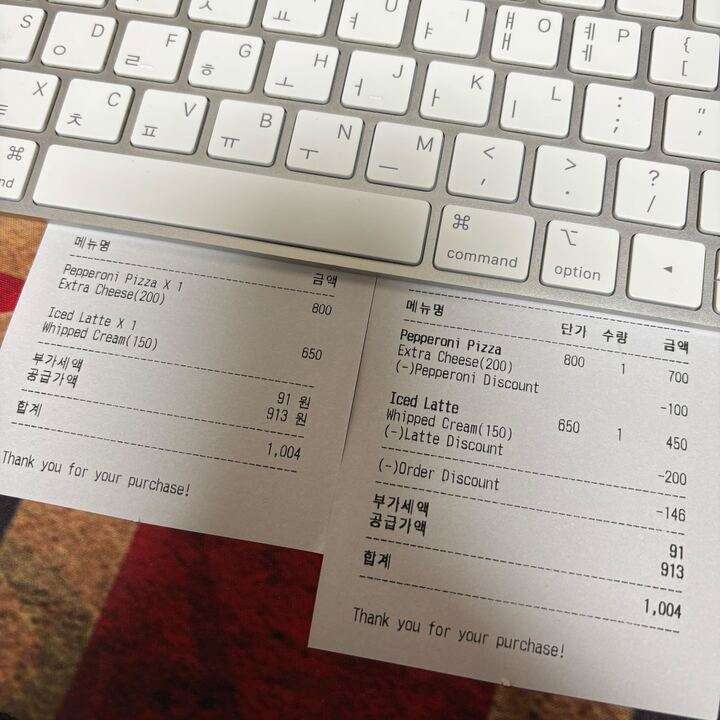
Toss POS에서 프린터를 제어하기 위한 API예요. 결제된 건에 대한 영수증을 출력할 수 있어요.
주의사항
프린터 연결: 토스 프론트에 프린터가 연결되어 있어야 해요.
Methods
printReceipt
이미 결제된 건에 대해 토스 프론트에 연결된 프린터로 영수증을 출력해요.
Parameters
| 파라미터 | 타입 | 필수 | 기본값 | 설명 |
|---|---|---|---|---|
paymentKey | string | ✓ | - | 결제된 건의 paymentKey |
count | number | ✓ | - | 출력할 영수증 수량 |
orderInfo | Object | - | 주문 정보. 아래 orderInfo 구조를 참고해요 | |
additionalText | string | - | 추가 텍스트 (선택) |
orderInfo 구조
orderInfo는 선택 파라미터예요. 하지만 전달한다면 아래 필드를 모두 채워야 해요. 선택 옵션이나 할인이 없으면 빈 배열([])을 넣어주세요.
| 파라미터 | 타입 | 필수 | 설명 |
|---|---|---|---|
orderItems | Object[] | ✓ | 주문 항목 목록 |
orderItems[].count | number | ✓ | 주문 수량 |
orderItems[].menu.title | string | ✓ | 메뉴 이름 |
orderItems[].menu.originPrice | number | ✓ | 메뉴 정가 |
orderItems[].menu.selectOptions | Object[] | ✓ | 선택 옵션 목록 |
orderItems[].menu.selectOptions[].title | string | ✓ | 선택 옵션 이름 |
orderItems[].menu.selectOptions[].price | number | ✓ | 선택 옵션 가격 |
orderItems[].discounts | Object[] | ✓ | 주문 항목별 할인 목록 |
orderItems[].discounts[].title | string | ✓ | 할인 이름 |
orderItems[].discounts[].price | number | ✓ | 할인 금액 |
discounts | Object[] | ✓ | 주문 전체 할인 목록 |
discounts[].title | string | ✓ | 할인 이름 |
discounts[].price | number | ✓ | 할인 금액 |
Response
반환값이 없어요. 출력에 성공하면 Promise가 완료되고, 실패하면 에러가 발생해요.
Example
js
/**
 * 영수증 출력
 * @param {Object} params 출력 파라미터
 * @returns {Promise<void>} 출력 완료 Promise
 */
await sdk.printer.printReceipt({
  paymentKey: "paymentKey",
  count: 1,
  orderInfo: {
    orderItems: [
      {
        count: 1,
        menu: {
          selectOptions: [
            {
              title: "Extra Cheese",
              price: 200,
            },
          ],
          title: "Pepperoni Pizza",
          originPrice: 600,
        },
        discounts: [
          {
            title: "Pepperoni Discount",
            price: 100,
          },
        ],
      },
    ],
    discounts: [
      {
        title: "Order Discount",
        price: 100,
      },
    ],
  },
  additionalText: "Thank you for your purchase!",
});

console.log("영수증 출력 완료");
사용 예시
영수증 출력 관리 클래스
js
class ReceiptManager {
  /**
   * 영수증 출력
   * @param {string} paymentKey 결제 키
   * @param {number} count 출력 수량
   * @param {Object} [orderInfo] 주문 정보
   * @param {string} [additionalText] 추가 텍스트
   */
  async printReceipt(paymentKey, count = 1, orderInfo, additionalText) {
    try {
      await sdk.printer.printReceipt({
        paymentKey,
        count,
        orderInfo,
        additionalText,
      });
    } catch (error) {
      console.error("영수증 출력 실패:", error);
      throw error;
    }
  }
}

// 사용 예시
async function printReceiptExample() {
  const receiptManager = new ReceiptManager();

  try {
    await receiptManager.printReceipt(
      "paymentKey",
      1,
      {
        orderItems: [
          {
            count: 1,
            menu: {
              selectOptions: [
                {
                  title: "Extra Cheese",
                  price: 200,
                },
              ],
              title: "Pepperoni Pizza",
              originPrice: 600,
            },
            discounts: [
              {
                title: "Pepperoni Discount",
                price: 100,
              },
            ],
          },
        ],
        discounts: [
          {
            title: "Order Discount",
            price: 100,
          },
        ],
      },
      "Thank you for your purchase!"
    );
  } catch (error) {
    console.error("영수증 출력 중 오류 발생:", error);
  }
}
영수증 출력 예시